Your coding agents. One live view.

Run more agents Lose less context

View on GitHub
curl -fsSL https://coslash.io/install.sh | bash
coSlash Hub

Run more agents. Keep your data.

Your agent Your data Your call

Know what needs you Active, waiting, idle, or inactive across every repo and branch.
Keep the thread Goals, decisions, files, commits, and every command the agent ran.
Keep going Resume with context intact, or hand a brief to a fresh agent.
CC Claude CodeLive now
CX CodexLive now
CU Cursor AgentLive now
GK Grok BuildLive now
+ More agents
OC OpenCode
PI Pi
01 — Sessions

Keep moving without losing context.

Waiting on youquestions, permissions, failures Actively workingwith subagent lineage Worth a lookwindow filling, cache going cold
02 — How it works

Your work stays on your machine.

01

Reads your disk

Read-only, always.

02

Builds the record

Goals, decisions, files, commands.

03

Puts you back in

Resume, or hand off to a fresh agent.

coSlash skills for Claude Code and Codex
03 — Remote host

Local or remote. Same list.

Read-only. Asks before installing.

coSlash — Sessions 127.0.0.1:8787
04 — Resume or hand off

Resume or start fresh.

91% context, compacted 2×, 14 behind mainthis one says start fresh

05 — FAQ

Quick answers.

Which of my agents needs me right now?

Agents stall quietly on a question or a permission, and you only notice an hour later. coSlash sorts every session by status and flags the one waiting on you, with what it's stuck on.

This session is nearly out of context. Resume or start fresh?

Long sessions get compacted and drift from main, and the agent starts guessing. coSlash shows context used, cache and branch drift, then writes a handoff so a fresh agent starts with the full story.

Can I continue in a different agent?

Yes. Handoffs are plain Markdown, so work started in Claude Code can carry on in Codex or Cursor.

Some of my agents run on a remote server.

Add the host from your SSH config and its sessions join the same list. Read-only, and it asks before installing anything.

Is it safe on my work machine?

It only reads the transcripts your agents already write and never touches your code. Nothing leaves your machine unless you turn on Hub. Free and open source, MIT.

The session ends. The knowledge stays.

Free and open source.

Why coSlash Hub

You own the outcome.
You also own all the data around it.

01 CaptureFrom your agent transcripts
  • DecisionsWhat it chose, and why
  • ActionsFiles, commands and commits
  • Findings & failuresWhat it learned, and what didn’t work
02 KeepWhy it matters
  • It’s more than the codeEvery session also holds what your agent tried, found and ruled out.
  • It’s stuck on one machineEach agent keeps it on one laptop, in its own format. Switch machines or agents and it’s out of reach.
  • It compoundsIn the AGI era, what your agents learned is your most valuable asset.
03 UseWhat you do with it
  • Knowledge & skillsDistil sessions into notes and skills, for you and your collaborators.
  • Reports & summariesWeekly digests of what shipped, and why.
  • Better agentsGive agents past decisions as context, through MCP.
01 — Your data

Every finding. Every decision.

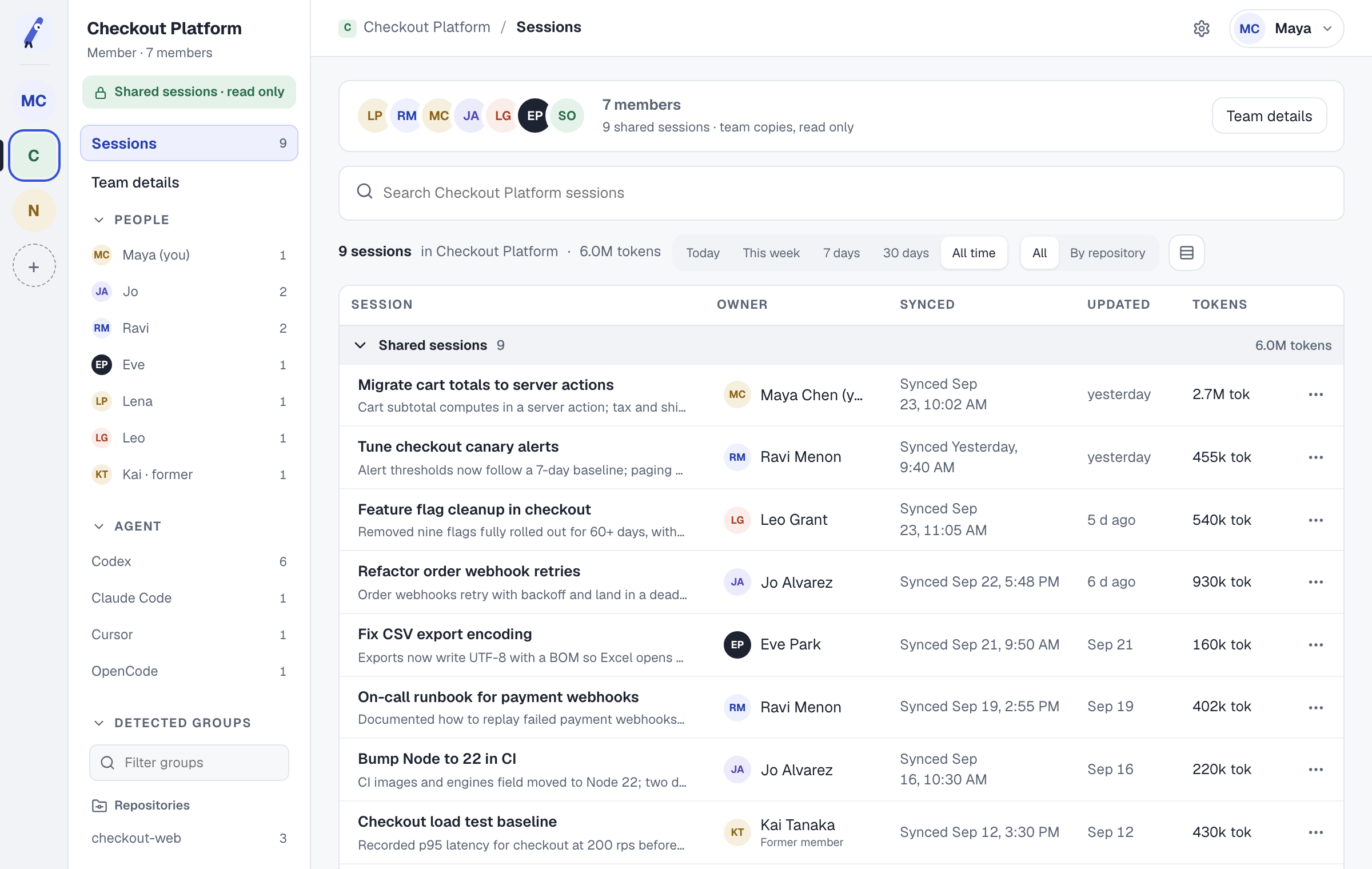
Shared spacethe whole team’s sessions Who did whatan owner on every session MCP readyyour agent sees other agents
coSlash Hub team space: Checkout Platform's shared sessions, each with its owner, repository and agent
02 — Your call

Save it. See why.

01

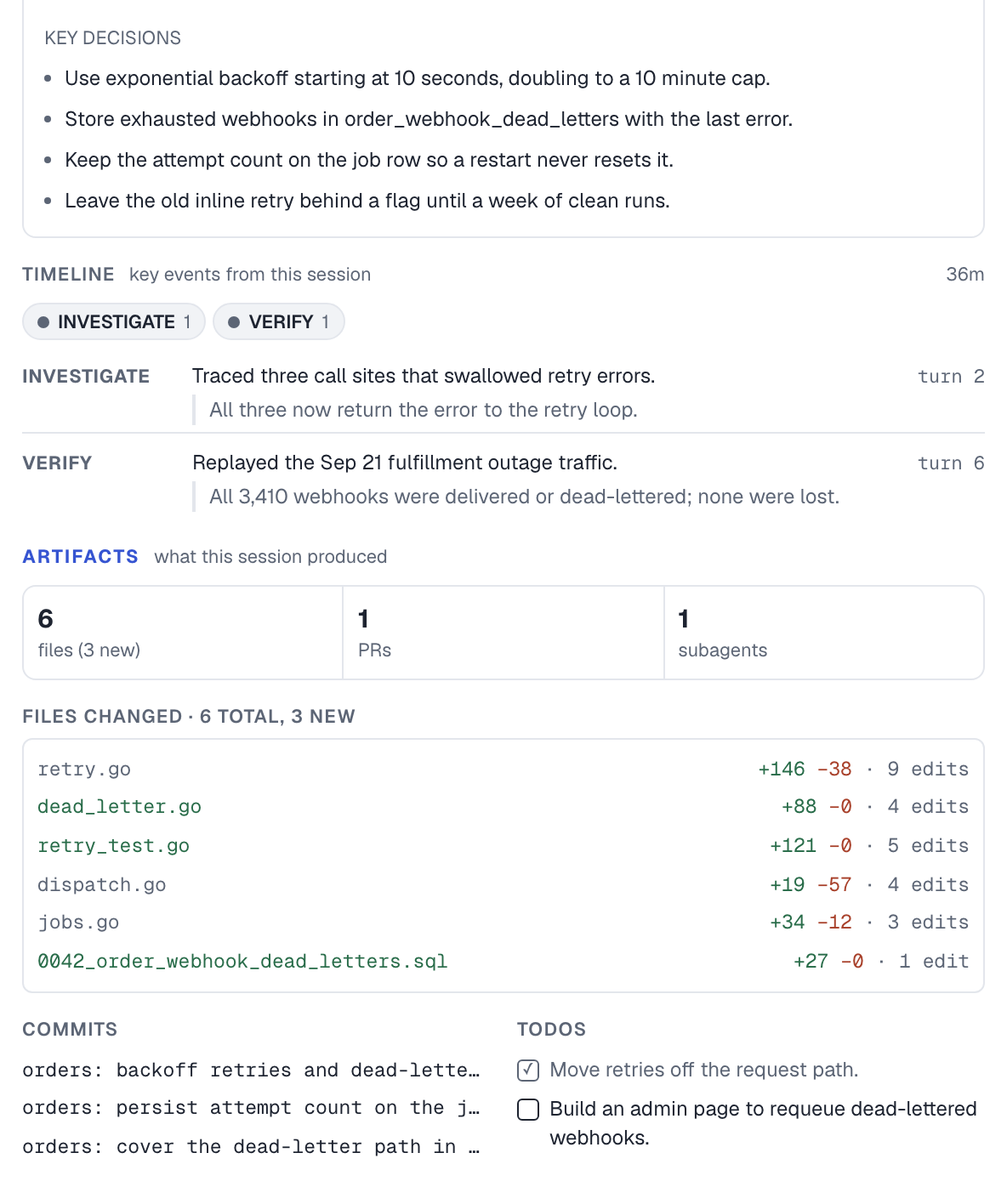
Every session, easy to read

What changed, and which decisions were made.
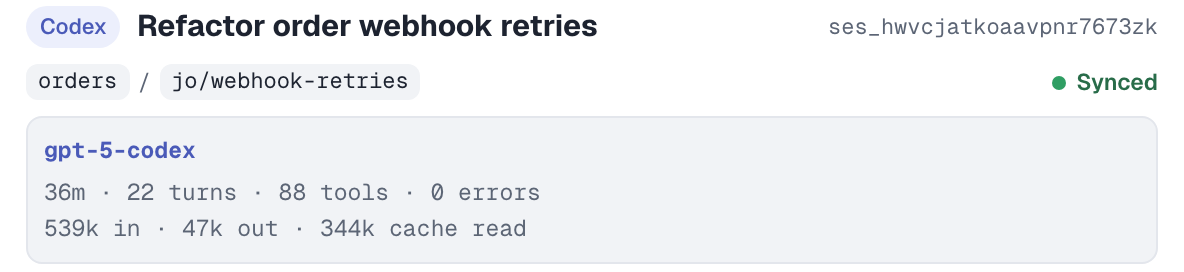
Session card: Refactor order webhook retries in Codex, orders / jo/webhook-retries, synced Key decisions, timeline, six changed files with line counts, commits and todos for the session
02

Bring your agent to learn from it

Copy the handoff, or let your agent read past sessions over MCP.
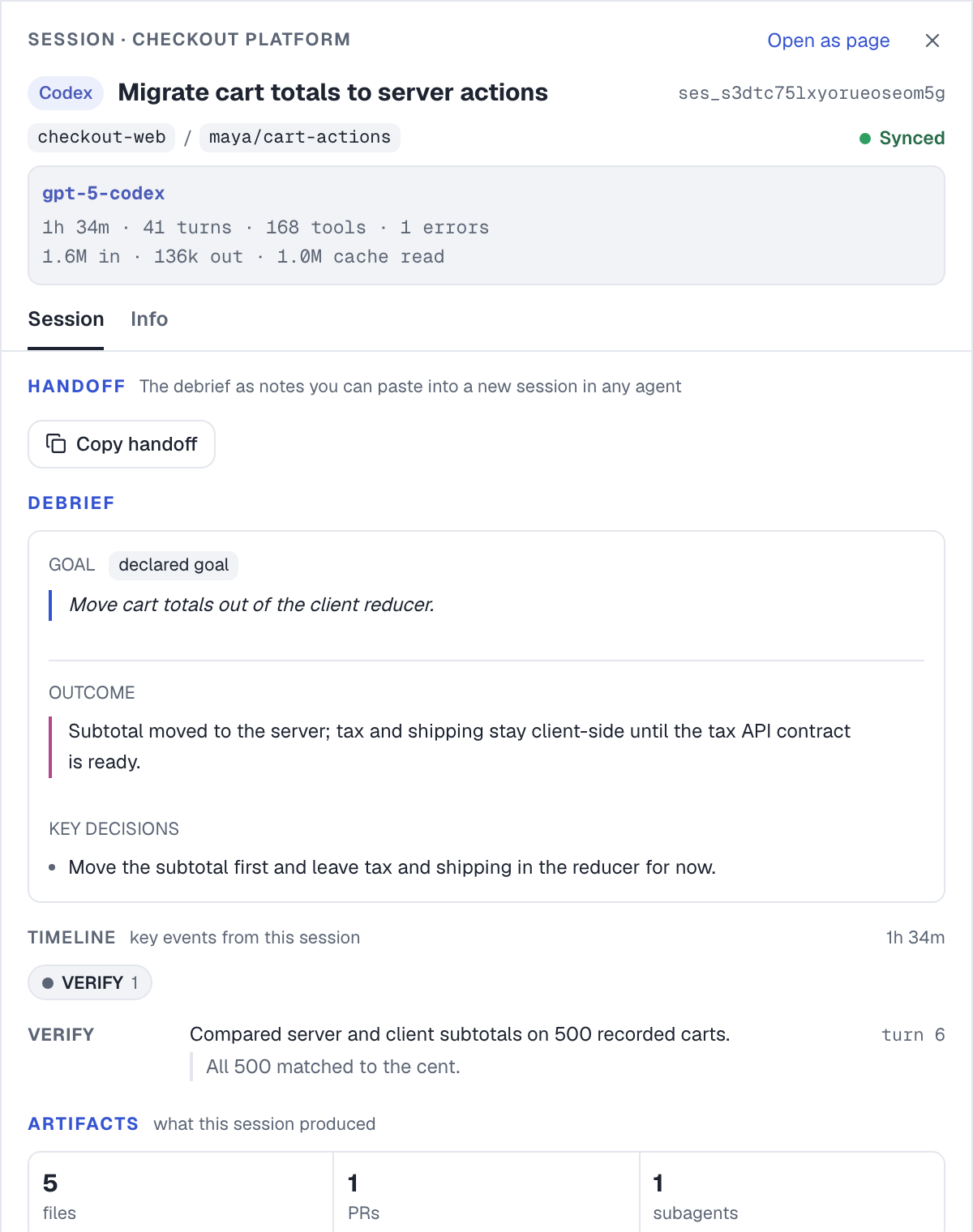
coSlash Hub session debrief: goal, outcome, key decisions and what the agent verified
03 — Pricing

Start free. Pay as you grow.

Every session your coding agents run, kept in one place: searchable, shareable and ready to hand off.

Saves sessions from Claude Code Codex and more1

Individual

$0

Try it on one machine. No card needed.

  • Sessions from Claude Code, Codex and more1, saved automatically
  • 1 machine
  • Your last 14 days of sessions
  • Share any session by public link, with passwords and keys scanned out
  • Join a team when you're invited
Start free

$15/ month

$12/ month, billed yearly at $144

All your work, all the way back.

  • Everything in Free
  • Up to 3 machines: macOS, Windows or a remote server
  • Your full history, searchable from day one
  • A shared space for you and up to 2 others
  • Unlimited share links
  • Email support

14 days free Card required. Cancel before your trial ends to avoid a subscription charge.

Try Pro free
Team

$29per person / month

$24per person / month, billed yearly at $288 per person

One shared memory for the whole team.

  • Everything in Pro
  • Up to 3 machines per person
  • Share sessions and handoffs with your whole team
  • Pick up a teammate's work with the context intact
  • Teammates who only read sessions don't need a paid seat

14 days free Card required. Cancel before your trial ends to avoid a subscription charge.

Start a team
Enterprise

Custom

Security and compliance for your company.

  • Everything in Team
  • Sign in with your company account
  • Keep the work when people leave
  • Set how long data is kept, with a full activity log
  • Choose where your data lives, or host it yourself
  • Use your own AI provider
  • Contracts, support and security reviews
Contact us

1Also Cursor, OpenCode, Pi and Grok Build, in the desktop apps and CLIs, subagents included.

04 — FAQ

Quick answers.

New to HubGetting started on your own

How do my sessions get to Hub?

Install coSlash Local, the free app, and turn on Hub. Sessions from every agent coSlash Local supports sync as you work, from every machine you connect.

Is my code safe? Who can see my sessions?

Hub keeps a record of what the agent did: its plan, decisions and changes, not your whole repository. Only you see it until you share, passwords and keys are hidden when you do, and it is never used for training.

What data does Hub save for me?

A record of each agent session, taken from your agents' transcripts on the machines you connect: the goal, the decisions it made and why, the files, commands and commits it touched, and what it found or ruled out. Your repository itself stays where it is.

Leading a teamSetting up and reviewing agent work

How do I set up a team?

Start a team, name it and invite people by email. Everyone keeps a private space and shares sessions to the team when they choose.

Can I see why an agent made a change before I approve it?

Yes. A pull request shows what changed; the shared session shows the plan, the decisions and what the agent checked, next to the changes.

What happens to our knowledge when someone leaves?

Agent history usually lives on one laptop and leaves with it. In a team space it stays searchable for everyone, and Enterprise keeps it after an account is removed.

Run more agents. Keep your data.

Install coSlash

Install for macOS.

For Apple Silicon and Intel Macs.

Quick install

Downloads and runs the macOS installer.

curl -fsSL https://coslash.io/install.sh | bash

Homebrew

Install from the coSlash tap.

brew install centauri-ai/tap/coslash
Install coSlash

Download for Windows.

For Windows 11 (amd64).

Portable download

Download coslash-windows-amd64.exe from the newest stable release that includes it, or the newest prerelease if needed. Double-click to run. No administrator rights or WSL required.

Download from GitHub releases

To update, replace the executable with a newer download. Windows binaries are currently unsigned and may show a SmartScreen warning.

Agent skills

Install the skills.

Add the coSlash skills for sessions, handoff, send, review, and doctor to your agents. Run coSlash for the first four skills.

Claude Code

claude plugin marketplace add centauri-ai/coslash
claude plugin install coslash@centauri-ai

Codex

codex plugin marketplace add centauri-ai/coslash
codex plugin add coslash@centauri-ai

Grok Build

grok plugin install centauri-ai/coslash@stable#plugins/coslash --trust
grok plugin enable coslash

Cursor CLI, OpenCode, and Pi

npx skills@latest add centauri-ai/coslash -g -a cursor -a opencode -a pi --skill '*' -y